Website generator

A website you build yourself — without writing a line of code

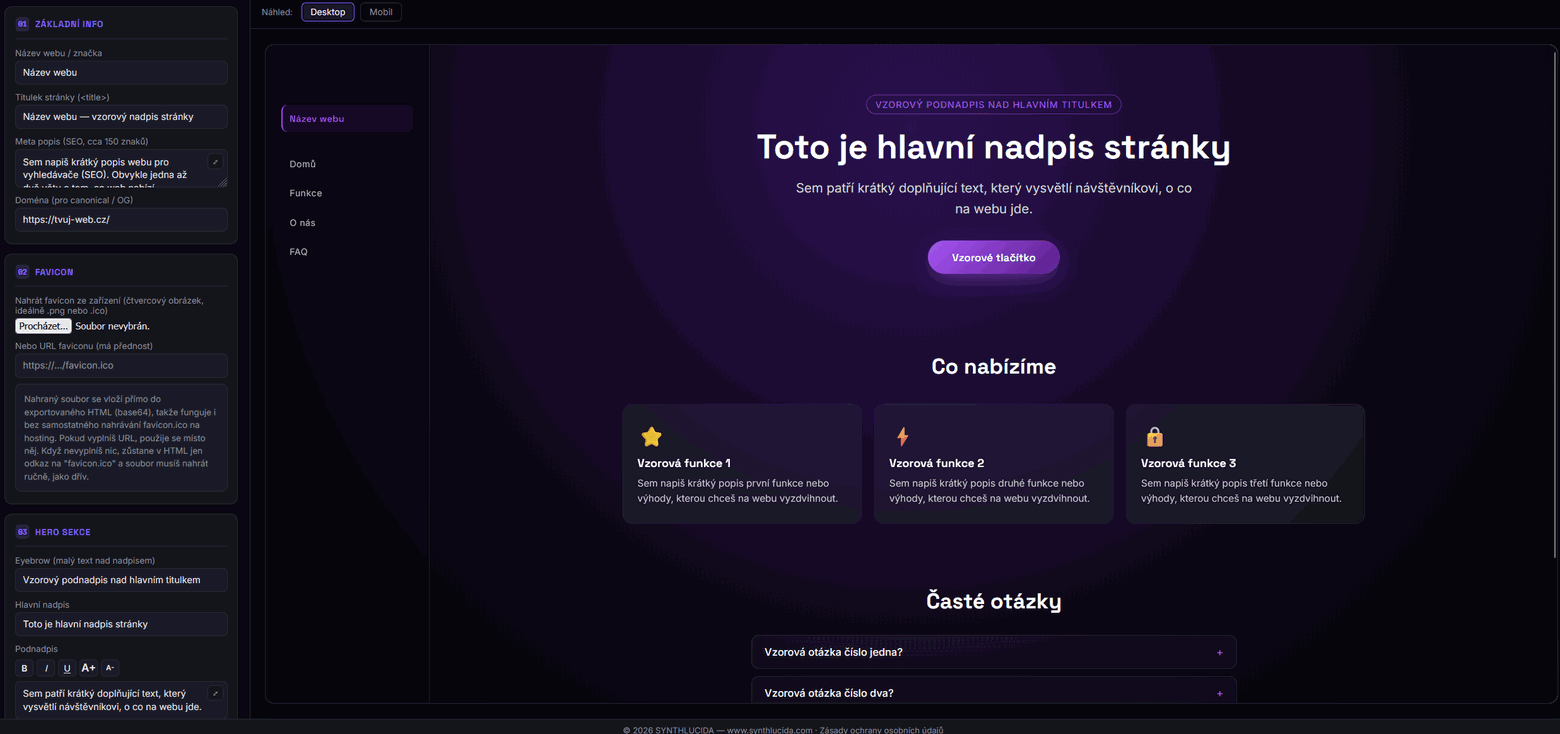
SYNTHLUCIDA WEBZENith is a free tool that builds a site through a form: fill in text and content on the left, and see a live preview on the right. When you're done, download a finished, working website — a single page, or a full site with several pages.

Free No coding No sign-up Installable as an app
synthlucida.com/webzenith-en.html
SYNTHLUCIDA WEBZENith editor — form on the left, live website preview on the right

Form on the left, live website preview on the right

What WEBZENith can do

One place for content, design and SEO

An honest overview of the main features, nothing overstated.

📝

Form and live preview

Fill in text, colors and content in the form on the left, and see exactly how the site will look on the right. Nothing to code.

📄

One page, or a multi-page site

Besides the main page, you can add custom pages — each with its own URL, title and search-engine description.

🎨

16 style presets + manual control

Pick a ready-made color-and-font combination, or fine-tune colors, fonts and the hero/card layouts yourself.

🔍

SEO built in from the start

Title, meta description, sitemap.xml, robots.txt and structured FAQ data — the generator prepares all of it for you.

📲

Installable as an app

Optionally generates a manifest.json and a service worker, so visitors can install the site to their home screen and use part of it offline.

🎬

Video and audio

An optional section for a YouTube/Vimeo video or your own audio recording, right below the features cards.

✉️

Contact form and FAQ

Connect the form to Formspree, Web3Forms, Netlify Forms or a plain mailto link. FAQ entries also turn into structured data for Google.

🧩

404 page, cookie bar and GDPR page

A dedicated 404 page, a simple cookie notice, and a general privacy-policy template that adapts to the contact form you choose.

💾

Save your progress

The app keeps auto-saving your work in the browser, and you can also download the project as a file and reopen it on another computer.

Process

From a blank form to a finished website

Four steps, no web hosting knowledge, no coding.

1

Fill in the basics

Site name, page title and meta description for search engines.

2

Build the content

Hero section, feature cards, FAQ, and optionally video, audio or a contact form.

3

Pick a look

One of 16 presets, or your own colors, fonts and hero/card layouts.

4

Download and upload

Just the main page, or the whole site with all pages — to any hosting.

16 style presets, 6 hero layouts and 4 card layouts — a fitting look is a few clicks away, and every color, font and layout can still be adjusted by hand.

FAQ

What people usually ask

Is WEBZENith really free?

Yes. Building a site, the form, the live preview and downloading the finished website are all free with no time limit. There's an optional Gumroad support option that removes the SYNTHLUCIDA footer link and the break-reminder popup during editing — it doesn't affect the core functionality.

Do I need to know how to code?

No. The whole site is built through a form, and the generator produces the finished HTML file for you.

Where do I upload the finished website?

You can upload the downloaded file (or files, if you have extra pages) to any static-site hosting — GitHub Pages, Netlify, or a regular web host.

Can it generate more than one page?

Yes. Besides the main page, you can add any number of custom pages, each with its own title, description and URL — which also helps with SEO.

Can the website be installed as an app?

Yes, optionally. The generator can create a manifest.json and a service worker, so visitors can install the page to their home screen or desktop.

What if I can't finish the site in one sitting?

The app continuously saves your work-in-progress in the browser, and you can also download the project as a file and reopen it later, even on a different computer.

Articles

Articles about building a website

The same texts you'll find in the app itself under "Articles" — practical tips on SEO, content and site design.

How to build a website for free without coding — the complete guide

Setting up your own website today doesn't require knowing HTML, CSS, or any programming language. Tools like SYNTHLUCIDA WEBZENith work on the principle of a simple form: you fill in text, colors, and content on the left, see a live preview on the right, and at the end download a ready, working file that you just upload to any hosting.

What you'll need to build a website

All you need is a browser and a basic idea of what you want to say on the site — a name, a short description of your offer or service, a few photos, and contact details. The generator takes care of the graphics, layout, and technical details (SEO tags, PWA, sitemap) for you.

Step by step

  • Fill in the basic info — website name, title, and meta description for search engines.
  • Set up the hero section with your main message and add buttons with links.
  • Describe your services or products using cards and add frequently asked questions (FAQ).
  • Optionally add a video or audio, if it fits the site's content.
  • Choose colors and fonts that fit your brand.
  • Download the finished site and upload it to your hosting or domain.

The result is a one-page website (or a site with multiple subpages) that's responsive, fast, and ready to publish within a few minutes — with no monthly fee for a website builder subscription.

SEO basics for a small website: what to watch out for

Even a simple showcase website has a chance to rank in search engines if it follows a few basic rules. Google and other search engines mainly evaluate whether a page quickly and clearly answers what the user was searching for.

Title and meta description

The page title (<title>) should include the site name and a keyword that describes the offer — for example "Downtown Hair Salon — book online". The meta description then works like a short ad in the search results and should invite clicks, ideally within 150–160 characters.

Real subpages instead of hidden anchors

If a site covers several topics (say "About us", "Pricing", "Contact"), it's better for SEO to have them as separate .html pages with their own address, title, and description, rather than hiding them as anchors on one long page. That way search engines can rank each subpage separately according to its specific topic.

Speed, mobile version, and structured data

A website should display well on mobile, load quickly, and not contain unnecessarily heavy files. The FAQ section can also generate structured data, thanks to which the questions can appear directly in search results as an expandable list.

Sitemap.xml and robots.txt

The sitemap.xml file tells search engines all the addresses the site has available, and robots.txt determines what should or shouldn't be crawled. Both files are small details that are easy to forget, but they significantly help faster and more complete indexing of the site.

What is a PWA, and why even a small website can benefit from one

A PWA (Progressive Web App) is a website that behaves a bit like a mobile app — a visitor can "install" it on their phone or computer's home screen, launch it like an icon, and some content can even work offline.

What it's good for

For smaller businesses and personal sites, this means a customer can easily come back to the site — instead of searching in the browser, they just tap the icon on their home screen, similar to a regular app. This increases the chance that a visitor will come back a second time.

What's needed for it

Technically it mainly comes down to two files — manifest.json (describes the app's name, icons, and colors) and a service worker (sw.js), which handles caching and offline behavior. Both can be generated automatically — all that's left to add are the icon images themselves, in the correct sizes.

A PWA isn't a must for every website, but for projects where visitors return regularly (booking systems, simple tools, personal portfolios), it can noticeably improve the user experience without needing to build an actual mobile app.

How to write a hero heading and subheading that work

The hero section is the first thing a visitor sees on a website, and it decides whether they stay or leave right away. They usually only have a few seconds, so the heading and subheading need to immediately answer the question "what is this, and why should I care".

Heading — be clear, not clever

A concrete statement works better than a witty line that no one immediately understands. Instead of "We're changing the world", "Paperless bookkeeping for small businesses" is more effective — the visitor immediately knows what it's about.

The subheading adds, it doesn't repeat

The subheading should add a concrete detail or benefit, not repeat the heading in different words — for example who the service is for, how quickly you can start using it, or what problem it solves.

A button with a clear action

A CTA button should describe a specific step ("Book a consultation", "Download the price list") instead of a generic "Learn more" — that way the visitor knows exactly what clicking it will do.

Colors and fonts: how not to ruin a website with a bad choice

The color palette and typography decide whether a website looks professional or amateurish — and yet setting them up is usually a matter of a few minutes.

Contrast comes first

Text must be clearly readable against the background — light text on a light background, or dark on dark, is the most common mistake. If you're not sure, choose a stronger contrast rather than making visitors "decode" the text.

Fewer colors, more consistency

One main (accent) color for buttons and links, and one or two background colors, is usually enough. A website with too many bright colors looks chaotic and distracts from the content.

Fonts to match the site's character

Geometric, bolder fonts suit modern tech or creative projects, while classic sans-serif fonts feel more trustworthy for services, finance, or healthcare. The most important thing is that the font stays clearly readable on mobile too.

Images on a website: how to use them without slowing the site down

Images tend to be the heaviest part of a website and have the biggest impact on loading speed — and speed is one of the things both visitors and search engines evaluate.

Format and size

JPEG or the more modern WebP format works well for photos, and PNG or SVG for logos and icons with transparency. Before uploading an image, just resize it down to its actual display size (a hero section photo usually doesn't need to be wider than 2000 px) — unnecessarily large files just slow the site down.

Alt text

Alt text describes what's shown in the image, in case it fails to load, and also helps blind visitors using a screen reader, as well as search engines, understand the image content. A short, factual description is enough — "Café team preparing coffee", not just "image1".

When to use a URL and when to upload a file

An uploaded file is saved directly into the exported HTML, so the site works even without hosting images elsewhere — this suits smaller sites. For a larger site with lots of images, it's more practical to host the images separately and just insert their URLs, so the resulting HTML file stays smaller.

When to make a separate subpage, and when a section on the main page is enough

A smaller showcase website often gets by with a single page divided into sections (hero, features, FAQ), but for some topics it's worth making a separate custom page.

A section on the main page is enough when

It's short content that a visitor typically goes through within a single visit — such as a services overview, frequently asked questions, or a short "about us".

A separate page is a good fit when

  • The content is more extensive (a price list, a detailed service description, a longer article).
  • You want it to be shareable or findable in search engines on its own, with its own title and description.
  • Visitors will want to link to it separately (for example from an email or social media).

Separate pages also have an SEO advantage — each has its own address, title, and meta description, so a search engine can rank it according to its specific topic, instead of it competing with the content of the entire main page.

Mobile-first: how to make sure a website works on a small screen too

Most visitors today arrive at a website via a mobile phone, so it should be checked on a small screen first, not only after finishing it on a computer.

Text and buttons within thumb's reach

Buttons and links should be large enough, with enough spacing, to be comfortably tapped with a finger, and text should be readable without needing to zoom in.

Short lines, clear hierarchy

Long paragraphs and wide tables are hard to read on a narrow screen. It helps to have shorter text broken into paragraphs and headings, letting a visitor quickly figure out what a section is about.

Try it on a real phone

A browser preview on a computer never fully replaces a real phone — it's worth opening the site directly on a phone and going through it just as a visitor would.

How to write an FAQ section that actually helps visitors

A good FAQ section saves time for both the visitor and the site owner — instead of the same questions repeating in emails, the visitor finds the answer right on the page.

Pick real questions, not made-up ones

The best source of questions is the ones people actually ask — via email, phone, or social media. Made-up questions that nobody actually has just needlessly pad out the section.

Answer right away, no filler

The answer should come in the first sentence, with any further detail after it — a visitor who clicks a question open mainly wants a quick answer, not a paragraph before getting to it.

Address concerns, not just facts

Alongside practical questions (price, delivery time, contact), it's worth including questions that address doubts — such as what happens if the service doesn't work out, or how returns/complaints work.

Website loading speed: why it matters and how not to ruin it

A slow-loading website loses visitors before they even get to read the first sentence — and search engines account for this too, factoring speed into how they rank results.

Images are usually the biggest bottleneck

Unoptimized, high-resolution photos are the most common cause of a slow website. Simply resize them to the size actually needed before uploading, and use a more modern format like WebP.

Less is sometimes more

Every additional script, font, or widget slows the site down a little. It pays to keep only what actually serves a purpose on the page, and skip unnecessary extras.

Test it, don't guess

The subjective feeling of "it seems fast to me" may not match reality on a slower connection or an older phone — it's worth testing the site outside of ideal conditions every now and then.

How to add video or audio to your site

In the "Video / Audio" section on the left, you can optionally add a playable video and/or audio to the homepage — it appears right after the Features section, before the FAQ. Both fields are optional and can be used independently of each other.

Video — a link, or your own file

The easiest option is a YouTube or Vimeo link — a regular video address (e.g. from your browser's address bar) is enough, the generator converts it into an embedded video automatically. If you want your own video file, you can either upload it directly from your device or provide a URL — if you fill in both, the URL takes priority.

Audio

Audio works the same way — an uploaded file, or a URL (again, the URL takes priority if filled in). It shows up as a player with standard controls.

When to upload a file and when to use a URL

An uploaded file is embedded directly in the exported HTML — it works without hosting it anywhere else, but for video this significantly increases the resulting file size. For a longer video or audio, it's therefore more practical to host it elsewhere (e.g. on YouTube, or your own storage) and just paste the link here.

Captions above the player

You can optionally add a short caption (heading) above the video or audio player — useful when it needs a bit of context for why it's there.

See how quickly your website comes together

No sign-up, no credit card — just open it and start filling in the form.

Open WEBZENith for free